Run your flying school. Keep every aircraft airworthy. Give every pilot their own logbook.

eFlyingSchool is one system for flying schools and clubs running several aircraft. Bookings, billing, training records and aircraft maintenance all work from the same records, under your school's own name.

£150 a month for any size of school. Students and members are free to add.

G-DEMO

Example aircraft record

Serviceable

Next check
in 12.4 flying hours
Airworthiness review
in 74 days
  1. PilotLogs a 1.2 hour flight. Airframe and engine hours update themselves.
  2. PilotReports a landing light not working.
  3. SchoolAn instructor assesses the defect, and the booking calendar shows it before anyone books the aircraft out. Deferred
  4. PilotsCan see all the aircraft details that matter to them, including the deferred defect.
  5. OwnerSees the hours flown, the full defect history, and maintenance falling due.
  6. EngineerBuilds a work pack for the next service including defect rectification, then releases the aircraft to service.
  7. ManufacturerAdds a service bulletin to every airframe of this model.
One aircraft, one record. Each line comes from a different person, and everyone sees the information relevant to them.
  • Built by flying instructors and examiners
  • Running schools and maintenance organisations since 2013
  • In use at flying schools and CAMOs in the UK and Europe
  • For every aircraft type

Everyone gets their own tool. The school gets the whole picture.

Most school software is a system the school owns and everyone else feeds. eFlyingSchool works the other way round. Each person sees something built for their own job, and the school's administration comes out of the same records.

Choose a role to see what it gets:

School owner

Reports that show where your income comes from, and how hard your staff and your fleet are working.

  • Staff hours and customer billing hours, tracked
  • Aircraft utilisation and profitability
  • Fleet management and maintenance cost tracking
  • Sales and income reports
  • Your own billing rates and package offers
Administrator

Bookings, flight logging, sales, billing and customer records in one place, with the routine steps done for you.

  • A booking calendar for unlimited aircraft, classrooms and staff
  • Customers see aircraft availability and ask for bookings online
  • Full customer records
  • Customer invoices and billing accounts
  • Vouchers created and tracked in the system

Instructor

See at a glance what each student has been taught and what they have mastered, so nothing in the course is missed.

  • A framework for assessing progress on any training course
  • A full record of each student's progress
  • Write and edit your own online course material
  • Logbooks filled in automatically, for you and your students
  • Open any logbook entry to see the briefing, the flight, the notes and the assessment

Student pilot

Always know where you are in your course, with your school's training material to hand.

  • A clear view of your progress through any course
  • Your school's online training material
  • Pilot resources alongside your course
  • An electronic logbook that fills itself in
  • A calendar of all your booked lessons

Pilot

An online logbook that is always to hand and can never be lost.

  • Flights logged and analysed automatically
  • Reminders when your licence and medical fall due
  • Your flying recency tracked for you
  • Share your records with friends or syndicate members
  • Your own pilot development plan

Aircraft owner

Never miss a service, a maintenance check or a document renewal again.

  • Reminders for servicing and maintenance
  • Reminders for insurance, radio licence and airworthiness certificate or permit
  • Airframe and engine hours kept up to date in the aircraft logbooks
  • Defects recorded and followed through to resolution
  • Your engineer sees the logbook data and defect list directly

Engineer

Defect reports straight from the pilots, and a countdown on every component, so each aircraft stays airworthy.

  • Serviceability status and a defect log for each aircraft
  • A countdown to the next service
  • Aircraft logbooks kept automatically, with the aircraft's documents stored alongside
  • Work packs, with due dates and countdowns reset when the work is signed off
  • Reminders and countdowns for life-limited parts

Your owners and your engineer work on the same aircraft record as you.

Many school and club aircraft belong to a member or a group and are looked after by an outside engineer or a CAMO. eFlyingSchool gives each of them their own view of the aircraft, so a defect reported after a flight reaches the people who need to know without a phone call.

The maintenance side is in daily use at working CAMOs, and it keeps growing from what they ask for.

Status overview
The aircraft, its owners, when the next service is due, and the dates for annual checks, insurance and permits. Colour-coded warnings appear when anyone books the aircraft out.
Aircraft logbook
Filled in from the flights recorded elsewhere in the system, with the maintenance work shown alongside.
Defects
Reported by pilots and sorted into four states: Grounded Deferred To monitor Resolved
Life-limited parts
Each part counts down in hours or days and alerts you before it needs replacing.
Recurring airworthiness directives
Counted down to the next inspection in the same way.
Work packs and release to service
Choose the tasks, generate the worksheet, do the work and release the aircraft. Every task you signed off moves on to its next due date by itself.
Documents
Licences, permits, insurance and checklists stored against the aircraft. Where a manufacturer takes part, its directives, service bulletins and manuals arrive on each airframe, and you record whether each one has been incorporated or does not apply.
Parts stock and history
A parts stock database, and a full history of the maintenance done on each aircraft.
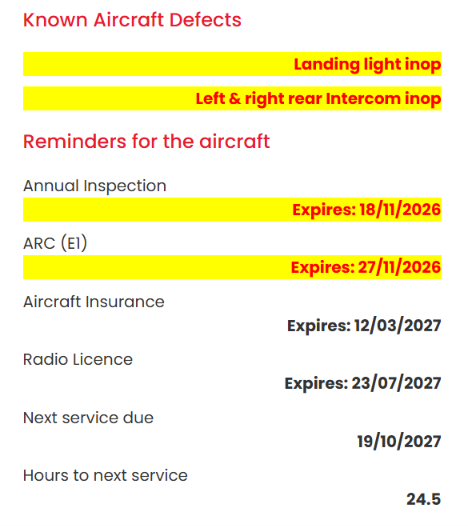
An aircraft's status panel: two known defects highlighted yellow, the annual inspection and ARC highlighted as due soon, and dates for insurance, radio licence and the next service, with the hours left to it.
Known defects and reminders, shown to anyone booking the aircraft out.
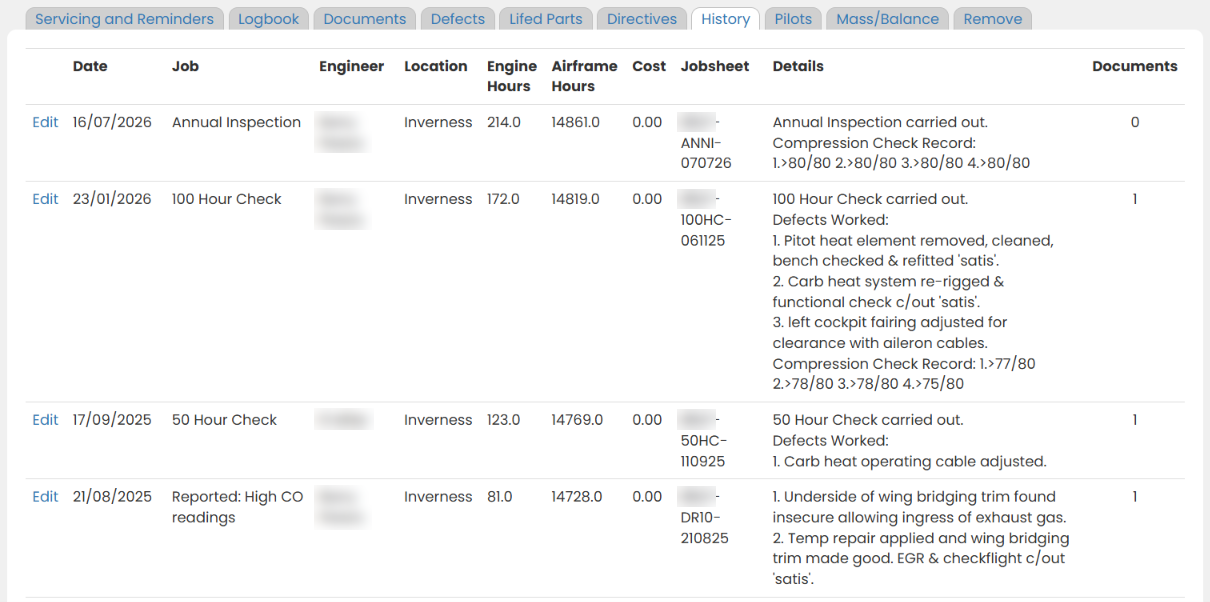
An aircraft's maintenance history: each job with its date, engine and airframe hours, job sheet and details of the defects worked. Engineers' names are blurred.
The aircraft's maintenance history, with the defects worked at every check.

Your courses, your material, fully tracked.

You know how you want to teach. Build your own courses, upload your own training material, and eFlyingSchool tracks every student against them.

  • Set up any course, to your own syllabus
  • Upload and edit your own online training material
  • See what each student has been taught and what they have mastered, by stage and by skill
  • Instructors sign off lessons electronically and add their notes
  • Any instructor can pick up a student and see exactly where they are
  • Student and instructor logbooks fill themselves in from the lessons flown
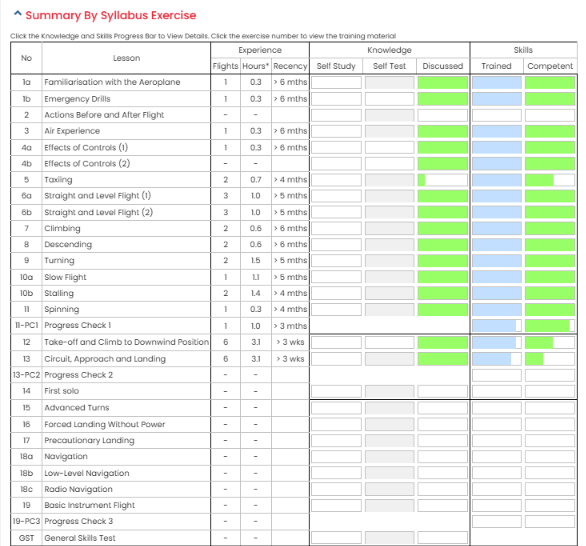
A student's summary by syllabus exercise, from familiarisation to the general skills test: flights, hours and recency for each lesson, with progress bars for knowledge and for skills trained and competent.
One student's progress, exercise by exercise.

Everything is included.

There are no modules to add and no features held back for a higher plan. This is the full list.

Bookings

  • Booking calendar for aircraft, instructors and classrooms, with no limit on how many
  • View the schedule by instructor or by aircraft
  • Customers see availability and ask for bookings online
  • Every booking appears in that person's own calendar
  • A departure board for the clubhouse wall
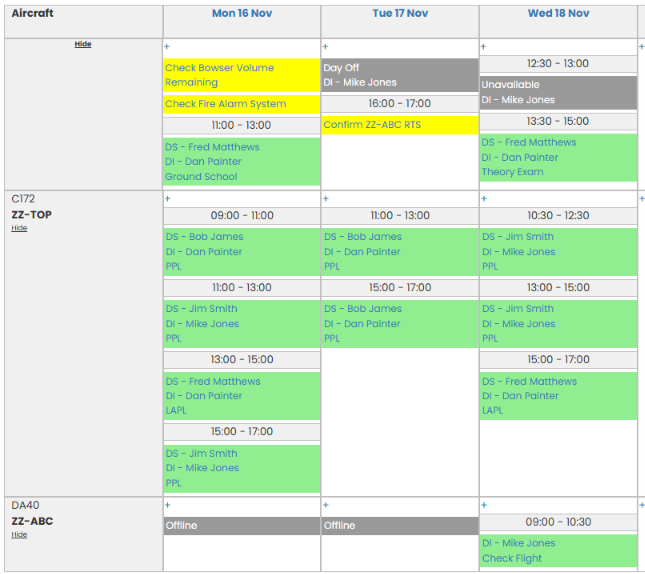
The booking calendar over three days: a row for each aircraft and one for the school, with flying lessons, ground school and a theory exam as green blocks showing the student, instructor and course, staff time off in grey, yellow reminders for school tasks, and an aircraft shown offline.

Customers and billing

  • Customer records and administration
  • A billing account for every customer
  • Charges raised when a flight is completed, then confirmed by your staff
  • Invoices produced automatically
  • Your own rates, packages and offers
  • Gift and trial-lesson vouchers, created and tracked
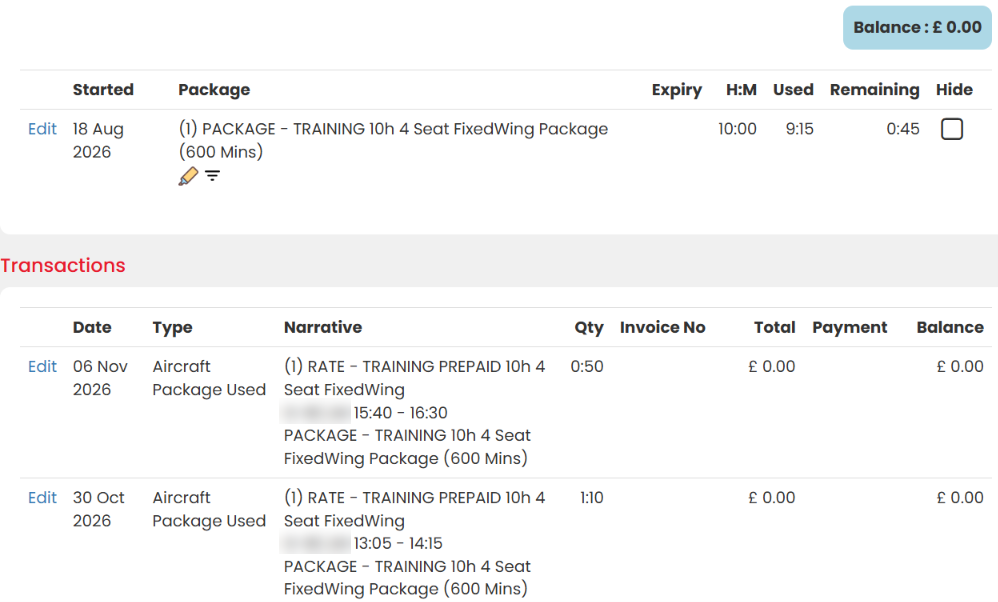
A customer's billing account: a ten-hour training package with time used and remaining, and transactions drawn from it flight by flight. Registrations are blurred.

Training

  • Your own courses and training material
  • Progress tracking by stage and by skill
  • Electronic sign-off by instructors
  • Training notes shared between instructors
  • Classroom and flight training in one record
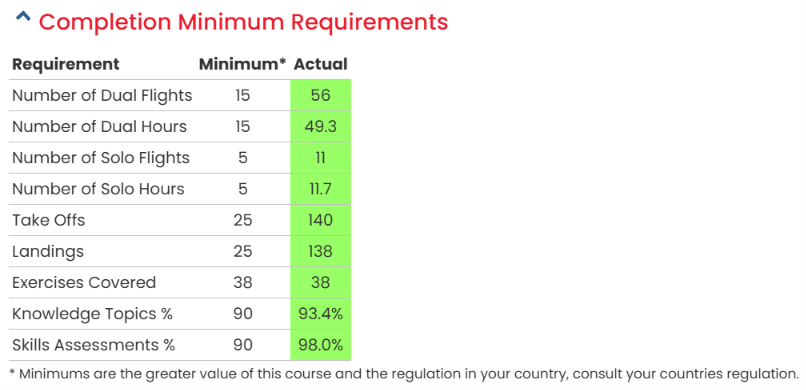
A student's completion against the course minimum requirements: dual and solo flights and hours, take-offs, landings, exercises covered, knowledge and skills percentages, all in green.

Pilots

  • A personal electronic logbook for every pilot
  • Licence and medical reminders
  • Recency tracked automatically
  • Personal development plans
  • Records shared with syndicate members
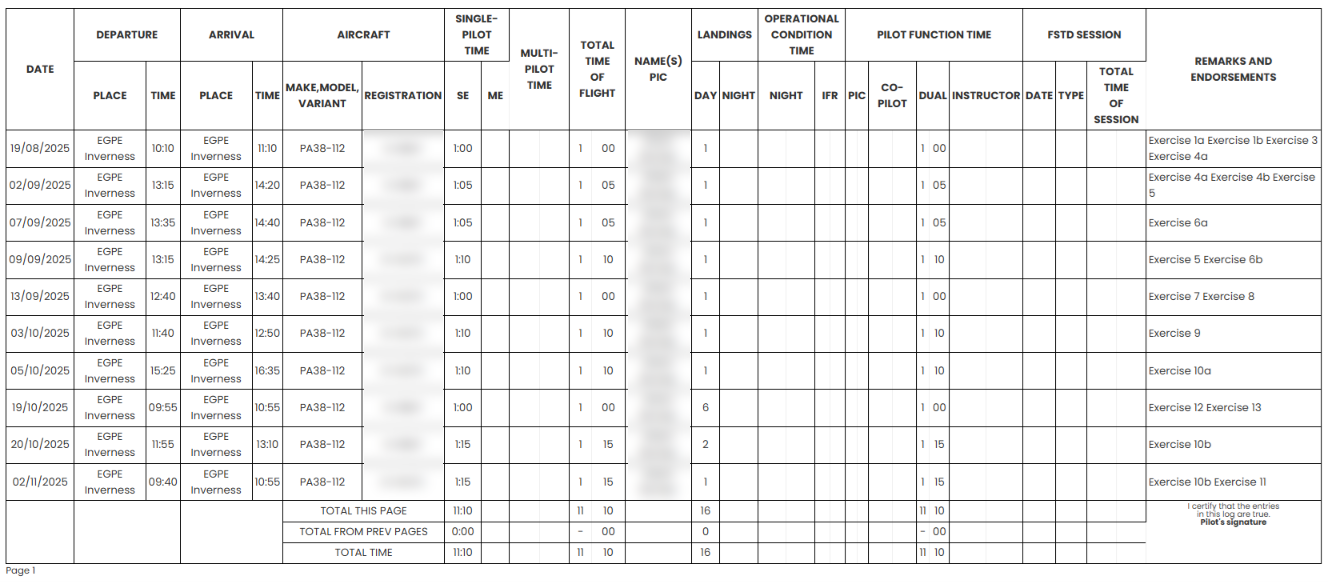
A page of a pilot's electronic logbook: ten training flights in a PA38, with times, landings, dual hours, page totals and the syllabus exercises flown in the remarks. Names and registrations are blurred.

Aircraft and airworthiness

  • Aircraft logbooks kept from the flights recorded
  • Service, maintenance and document reminders
  • Defect reporting and monitoring
  • Life-limited parts and recurring directives
  • Work packs with release to service
  • Parts stock
  • Aircraft data-logger integration
  • Access for owners, engineers and CAMOs
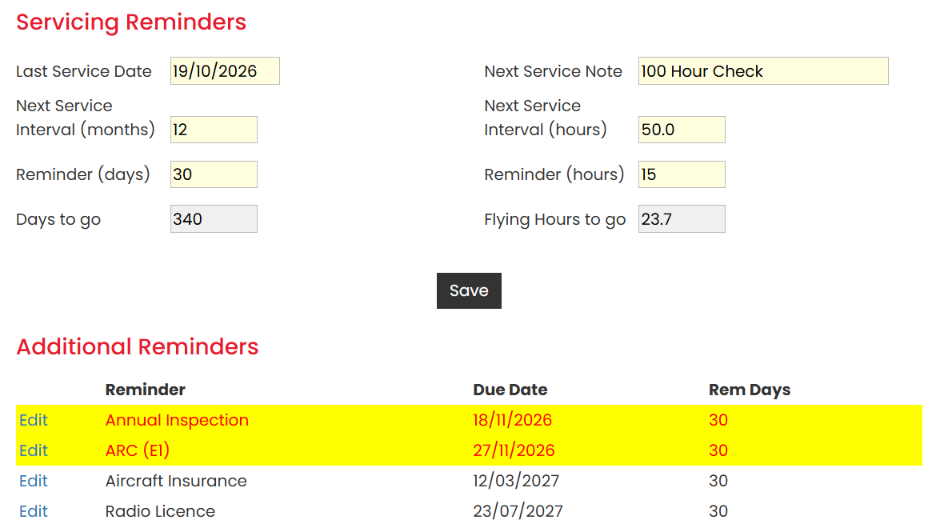
An aircraft's servicing reminders: last service date, intervals in months and hours, days and flying hours to go, and additional reminders with the annual inspection and ARC highlighted as due soon.

Safety and documents

  • Safety management system for reporting accidents, incidents and errors
  • Corrective and preventive actions recorded, with an audit trail for your aviation authority
  • Document storage for the school, its aircraft and its people
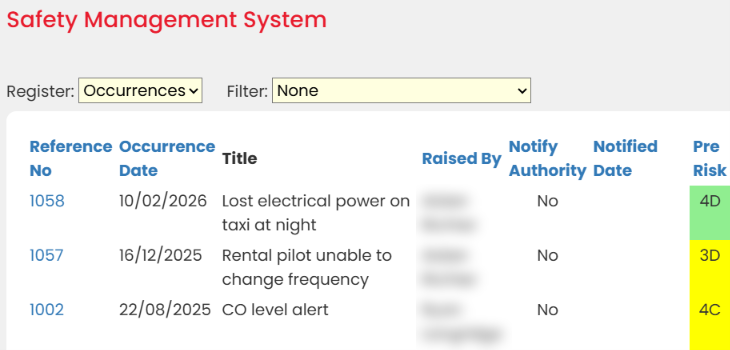
The safety management system's occurrence register: reference number, date, title, whether the authority was notified, and a colour-coded risk rating. Names are blurred.

Management

  • Sales and income reports
  • Aircraft utilisation and profitability
  • Staff hours and billing hours
  • Maintenance cost tracking
  • Further reports written on request
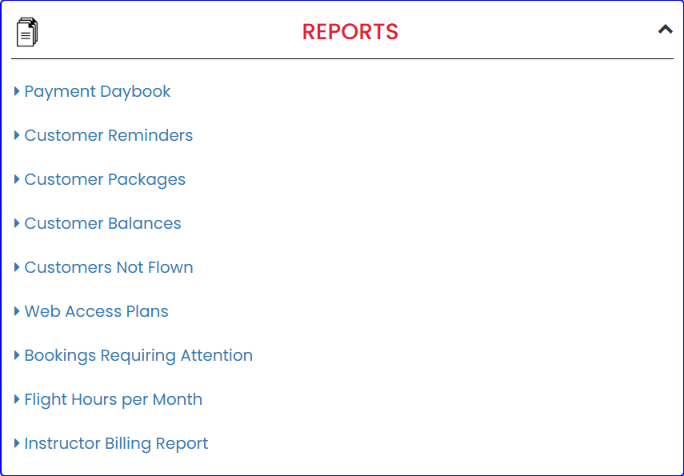
The reports menu: payment daybook, customer reminders, packages, balances, customers not flown, web access plans, bookings requiring attention, flight hours per month and instructor billing.

Your school's identity

  • Your own web address, colours and photographs
  • Email sent through your school's own Google or Microsoft account
  • Works in the browser on a computer, tablet or phone, with nothing to install
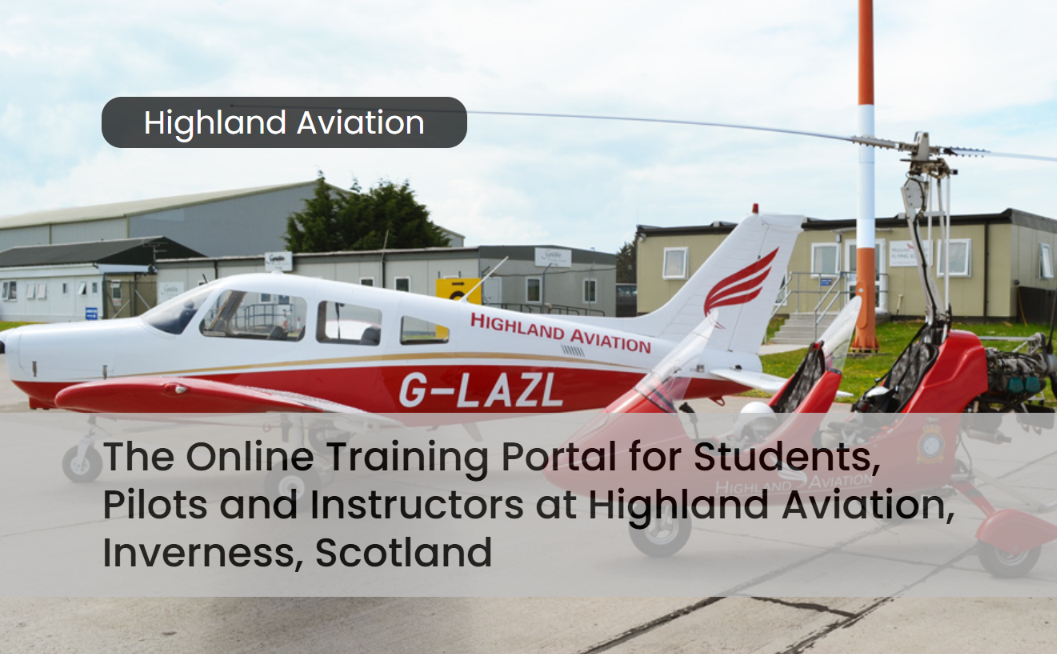
A school's own login page, with its own photograph and heading.

It carries your name, not ours.

Your students and members log in at your school's own web address and see your colours, your logo and your photographs. As far as they are concerned it is your school's system, and it promotes your school every time they open it.

One price, whatever your size.

£150 a month

No VAT to add. Invoiced monthly, paid by bank transfer.

  • Every feature on this page
  • Unlimited aircraft, staff, classrooms and users
  • Students and members are free to add
  • Your school's own branding and web address
  • Free one-to-one training for your administrators

There are no fees per aircraft, per student or per user. If you want to charge your members for their own logbook and records, add it to their billing account. That income is yours.

Arrange a demonstration

How you get started

  1. A personal demonstration

    We show you the system one-to-one and answer the questions that are particular to your school.

  2. Your school's site is set up

    We create your branded site with your web address, colours and photographs.

  3. Your administrators are trained

    One-to-one training for the people who will run it, free of charge. Video tutorials are on the way.

Where it comes from

eFlyingSchool began as Gyropedia, a training and school administration system written by gyroplane instructors and examiners who ran flying schools themselves. It became the established system of the gyroplane world, used by schools, school networks and aircraft manufacturers.

Fixed-wing schools saw it and asked for it. eFlyingSchool is the same system, under a name that fits every aircraft type.

Arrange a personal demonstration

Tell us a little about your school and we will arrange a time to show you the system one-to-one. The more you tell us here, the more useful the demonstration will be.

Sending this form opens your own email program with your answers filled in, ready for you to send. Nothing is stored on this website.

Questions schools ask

Is it right for a one-aircraft club or a syndicate?

Probably not. eFlyingSchool is built for schools and clubs running several aircraft, with students, instructors and maintenance to coordinate. For a single shared aircraft it is far more than you need, and a simple booking tool will serve you better.

Which aircraft types does it work for?

Any. The system is in use with fixed-wing aeroplanes and with gyroplanes, and nothing in it is tied to one type of aircraft.

Do you supply the training courses?

No. You build your own courses and upload your own material, and the system tracks every student against them.

Do our students and members have to pay?

Not to us. You can add as many students and members as you like at no charge. Whether you charge them is your decision, and anything you do charge goes through their billing account with you.

Does it cover what a CAMO needs?

Yes. Work packs with release to service, life-limited parts, recurring directives, defect management, document tracking and parts stock are all included, and the system is in daily use at working CAMOs.

Is there an app?

There is nothing to install. eFlyingSchool runs in the web browser and is laid out to work clearly on a phone, a tablet or a computer.

How do we pay?

We invoice your school once a month and you pay by bank transfer. The price is £150 a month whatever your size, with no VAT to add.

How long does it take to learn?

It is a large system, so we do not leave you to work it out alone. Your administrators get free one-to-one training, and video tutorials are being produced.